


Description
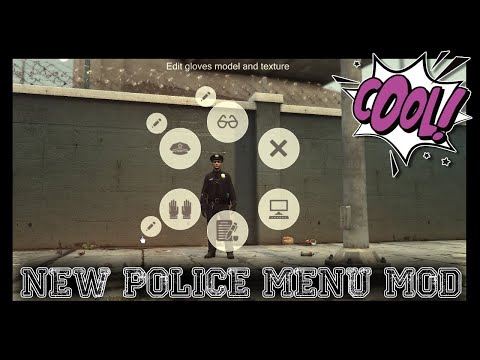
Welcome to Police Menu! A modern and quick access HUD to enhace your gameplay!
Are you tired of jumping through several menus, bashing your arrow keys to find that one setting you want to change? Are you a fan of realistic looking Police Computers and want to switch from the GTA5 looking menus? This mod will help you achieve this.
Police Menu offers quick access to a handful of every-shift use utilities. You can quick-equip gloves when you have to jump in and stop a fight, open the Police Computer for all kinds of information, write parking tickets for vehicles and many more!
Keybinds
Every key used by this pack can be changed in the PoliceMenu.ini settings.
By Default The Following Keys Are Used:
DialogKey=Y
InteractionKey=X
MenuKey=N
ModifierMenuKey=ControlKey
By default the Interactive Menu is opened by pressing N + Control at the same time.
Set ModifierMenuKey to “None” if you want to open it without pressing two keys at the same time.
Controller Keys:
NOTICE: By default, LSPDFR binds the “A” key to performing and cancelling traffic stops. It is advised to change this keybing inside LSPDFR to avoid cancelling the traffic stop when using the Police Computer.
Open Menu: RB + DPAD Down
Interaction key: DPAD Right
Accept key: A (unchangeable)
Cancel key: B
Scrolling key: DPAD up/down (unchangeable)
Vehicle Menu key: RB + DPAD Left
Vehicle Zoom Key: Pressing Right Stick (unchangeable)
Default sensitivity: 0.75
Installation:
Notice: If your game is crashing while loading
If your game is crashing during the loadingscreen after installing Police Menu, you need to install the following files:
Custom Gameconfig
mods/update/update.rpf/common/data
Heap Adjuster
main GTAV folder
Packfile Adjuster
Copy the plugins folder into your main Grand Theft Auto directory (ex: …/steamapps/common/Grand Theft Auto V/)
If installed correctly it should look like this: Grand Theft Auto V/plugins/LSPDFR/PoliceMenu.dll
Copy all files from the OPENIV folder into Open IV in the following path:
mods -> update -> update.rpf -> x64 -> data -> cdimages -> scaleform_generic.rpf
That’s It 😊 Have Fun Playing!
Features:
The ingame menu offers a modern HUD with the following options available:
Open Police Computer
>Callout Details
>Ped Database
>Ped Information
>Ped History
>Write Ped Citation
>Write Arrest Report
> Vehicle Database
> Vehicle Information
> Notepad
Place Speedcamera
Perform Drug Swab test
Perform Breathalyzer test
Request ambulance for Blood Test
Request Coroner
Request roadblock (after chase)
Write Parking Ticket
Take Pictures
Equip/unequip Sunglasses
Equip/unequip Hat
Equip/unequip Gloves
Equip/unequip Vest
Equip/unequip Mask
Safe and equip outfits
Court System:
Both Citations and Arrest Reports will sooner or later go to the San Andreas Court. You’ll receive a phonecall when a case is available at court (unless disabled in the .ini). Here you’ll be able to follow the proceedings and watch the outcome your citation / arrest has. This is purely optional and will not impact your gameplay in any way.
💡 Others also downloaded: 2006 Ford Crown Victoria 1T18 NEW York State Police, 2013 Chevrolet Silverado LOS Santos Police Department, 1998 Ford Crown Victoria ST. Thomas Police.
Author: RicyVasco
Discover Mods Loved by Other Gamers!


Share Your Gameplay!
Submit a screenshot of this mod!
Submit a YouTube video.