


Description
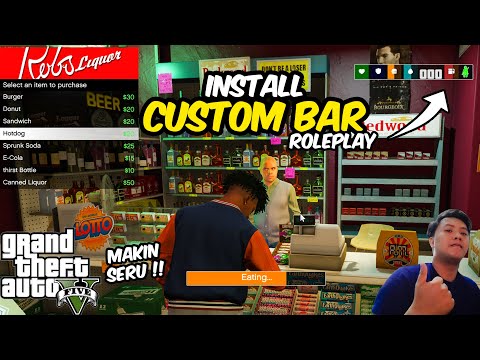
VHud is a comprehensive GTA V mod that introduces an advanced HUD system with customizable UI elements such as health, armor, hunger, thirst, and fuel bars. It allows players to interact with in-game stores and gas stations, providing functionalities like purchasing items and refueling vehicles. This mod also includes features for managing player inventory, seatbelt usage, and dynamic speedometer display.
Key Bindings:
Config Menu Key = F12 (To save settings, Just exit the menu using Back key)
Inventory Key = I
Seatbelt On/Off Key = B
Speedometer Unit Toggle Key = U
Features:
- Adjustable size and position for cash display, health bar, armor bar, hunger bar, thirst bar, fuel bar, and seatbelt indicator.
- Visibility toggles for various HUD components including health bar, armor bar, hunger bar, thirst bar, fuel bar, seatbelt bar, and speedometer.
- Health and armor tracking with visual indicators.
- Hunger and Thirst levels with gradual depletion and consumption effects.
- Starvation and exhaustion checks affecting player health.
- Inventory management allowing players to purchase and consume items. (e.g., Default Key is ‘I’)
- Item effects on food and water levels, including animations for item consumption.
- Fuel level tracking and refueling mechanics at gas stations.
- Speedometer with switchable units (KM/H or MPH). (e.g., Default Key is ‘U’)
- Seatbelt functionality with visual and audio feedback. (e.g., Default Key is ‘B’)
- Store locations with background sprites and blips on the map.
- Purchase menu for buying food and drinks with corresponding price tags.
- Custom sound effects for seatbelt activation and deactivation.
- Configurable menus accessible via keybindings (e.g., F12 for main menu, E for shop menu).
- Progress bar animations for item consumption.
- Blips for store and gas station locations.
- Red Ground markers indicating gas pump locations.
- Configuration file for saving user settings and inventory state.
- Automatic saving of configuration changes and inventory updates.
- Texture loading for HUD icons and other visual elements.
Requirements:
Latest ScriptHookVDotNet3. if you don’t have it yet.
Latest NativeUI. if you don’t have it yet.
Optional Remove Minimap Health Bar + Armor Bar. if you don’t have it yet.
For V1.1:
- vhud.ytd
- Pharmacy MLO – SP Version
- Motel MLO – SP Version
How To Install:
1. Put vhud.ytd here “Grand Theft Auto V/mods/update/update.rpf/x64/textures/script_txds.rpf/”
2. Then put vhud (folder), vhud.dll and vhud.pdb into the “scripts” folder
For V1.1 MLO Installation:
- Put apoteka_mapa, dip_pharmacy, moreo_pharmacy, swetoon_dollarpills, motel folder here /mods/update/x64/dlcpacks
- Open dlclist.xml ( /mods/update/update.rpf/common/data/dlclist.xml) and add these 5 after the last dlcpacks and save it
dlcpacks:/apoteka_mapa/
dlcpacks:/dip_pharmacy/
dlcpacks:/moreo_pharmacy/
dlcpacks:/swetoon_dollarpills/
dlcpacks:/motel/
❤ ️ Someone loved this mod 5 days ago!
💡 Others also downloaded: BMW X7 2NCS Widebody, Realistic Weapon Carry and Management, Escape from Merryweather V0.2 Beta.
Author: MNHC
Discover Mods Loved by Other Gamers!


Share Your Gameplay!
Submit a screenshot of this mod!
Submit a YouTube video.